
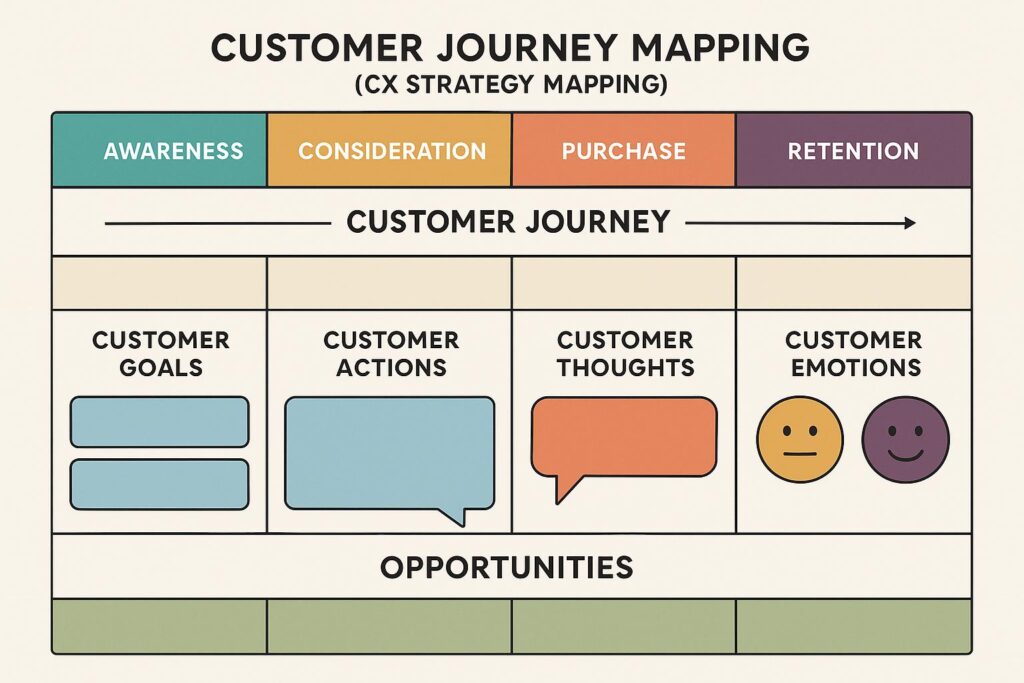
What Is Customer Journey Mapping in IT?
Imagine this: A customer contacts your IT helpdesk, navigates your support portal, or tries to reset a password. Every step they take is an opportunity for delight—or frustration. In today’s AI-powered world, understanding and optimizing these moments is crucial for IT and CX (Customer Experience) teams aiming to deliver seamless, productive experiences. Enter customer journey mapping IT: an essential technique for uncovering friction, aligning teams, and building smarter CX strategy mapping.
Why Customer Journey Mapping Matters in IT
IT environments are complex. Users interact with multiple systems, channels, and touchpoints. Without a clear view of these interactions, it’s easy for pain points—like long wait times or confusing processes—to go unnoticed. Customer journey mapping for IT visualizes every step your users take, empowering teams to:
- Spot bottlenecks and recurring issues
- Break down silos between IT and CX teams
- Prioritize improvements based on real data
- Design AI-driven prompts and automations that actually help
By mapping journeys, IT teams move from reactive firefighting to proactive, strategic CX improvement. Explore AI strategy frameworks here to align your mapping efforts with broader business goals.
Customer Journey Mapping Framework for IT Teams
Ready to get started? Here’s a simple, actionable framework for effective journey mapping in IT:
- Define key personas and scenarios. Who are your users? What are their common tasks (e.g., onboarding, password reset, incident reporting)?
- List every touchpoint. Map out all digital and human interactions: portals, chatbots, emails, calls, and more.
- Capture user emotions and pain points. Where do users get stuck? Which steps drive satisfaction or frustration?
- Identify quick wins and long-term improvements. Use your map to prioritize changes, from smarter AI prompts to streamlined interfaces.
- Measure impact and iterate. Track improvements in satisfaction, resolution times, and engagement. Update your maps as new tech or processes roll out.
Example: Journey Mapping for IT Password Resets
- User visits self-service portal → Confusing instructions cause drop-off
- User triggers chatbot → Prompt offers clear next steps, reducing tickets
- User receives follow-up email → Satisfaction survey pinpoints final friction
With journey mapping, your AI and CX strategy mapping efforts become targeted and measurable. See prompt engineering best practices for more ways to fine-tune digital interactions.
FAQ: Customer Journey Mapping in IT
- What is customer journey mapping in IT?
- It’s a process for visualizing each step a user takes when interacting with IT services, helping teams spot friction and improve the overall experience.
- How does journey mapping improve CX strategy mapping?
- By revealing pain points and user needs, journey mapping ensures your CX strategy addresses real issues, not just assumptions.
- Can AI tools enhance the journey mapping process?
- Absolutely—AI can analyze user behaviors, automate data collection, and even suggest optimized prompts or workflows based on journey insights. Learn more about CX best practices from Gartner.
- How often should IT teams update their journey maps?
- Anytime you launch a new tool, process, or receive significant feedback—at least quarterly to keep maps relevant and actionable.
- Where can I learn more about IT and CX strategy alignment?
- Check out Omni Legion’s CX strategy resources for frameworks and expert tips.
Next Steps: Elevate Your IT & CX Strategy
Customer journey mapping in IT isn’t just a buzzword—it’s a blueprint for better, faster, and smarter user experiences. If you’re ready to optimize your IT touchpoints or need help with AI-powered CX strategy mapping, Omni Legion’s experts are here to guide you. Start mapping, start improving.